
What your A-book earns: Hedge Analytics for brokers who A-book with FX-EDGE

Most growing brokers learn what their A-book earned once a month, as one number. Hedge Analytics breaks that number into trades and shows where the profit came from: markup on entry and exit, commission and swap, net of A-book costs. Then it shows how much markup each symbol needs to reach your target.
Ask a growing broker what its A-book earned last month and you’ll get one figure. Ask what it earned on gold last Tuesday, or which symbol lost it money, and the answer takes a spreadsheet and a day.
On the A-book, a broker earns the gap between each client’s fill and the hedge fill that covered it. It also keeps the commission and swap it charges the client, minus what its hedge account pays. Client trades sit in the CRM and hedge trades sit on the hedge account. Joining them by hand is why most brokers see one revenue figure at month end and can’t say which symbols produced it.
Hedge Analytics joins them. It is built by Match-Trade Technologies for brokers running a Match-Trader White Label, and FX-EDGE is an official Match-Trade partner. It pairs every A-booked client trade with the hedge order that covered it and shows what the broker kept on each one. It now reads hedge accounts held with FX-EDGE, so a broker that A-books with us can see what it earns on every trade, without waiting for a report from us.
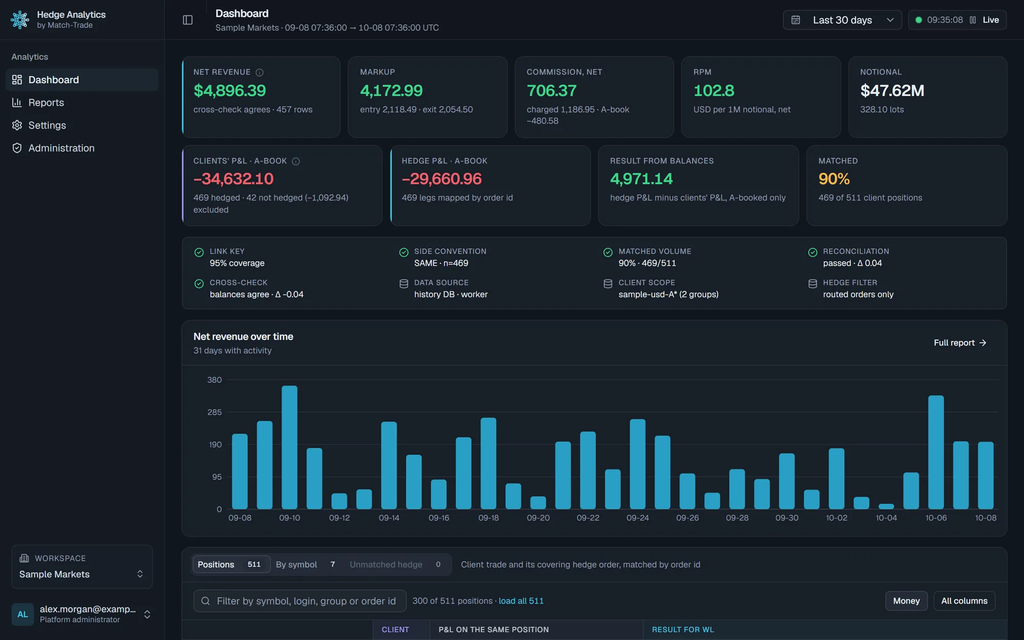
Net revenue, markup, commission, RPM and notional for the last 30 days. Illustrative data: fictional broker “Sample Markets”.
What you kept on every trade
Hedge Analytics reads your FX-EDGE hedge account with read-only access. It never places, changes or closes an order.
For each client position you see what you kept: markup on entry and exit, plus the commission and swap you charged the client, minus the commission and swap paid on the hedge account. Your client’s price sits next to the FX-EDGE fill, so you can see where each dollar of markup came from.
The month-end figure becomes a list of trades. Search by login, group or order id to see which clients and accounts paid for the month. Our charges sit in the same row, in USD, so the result you see is already net of what A-booking with us costs. The figures come from your CRM and your hedge account. FX-EDGE does not prepare or edit them.
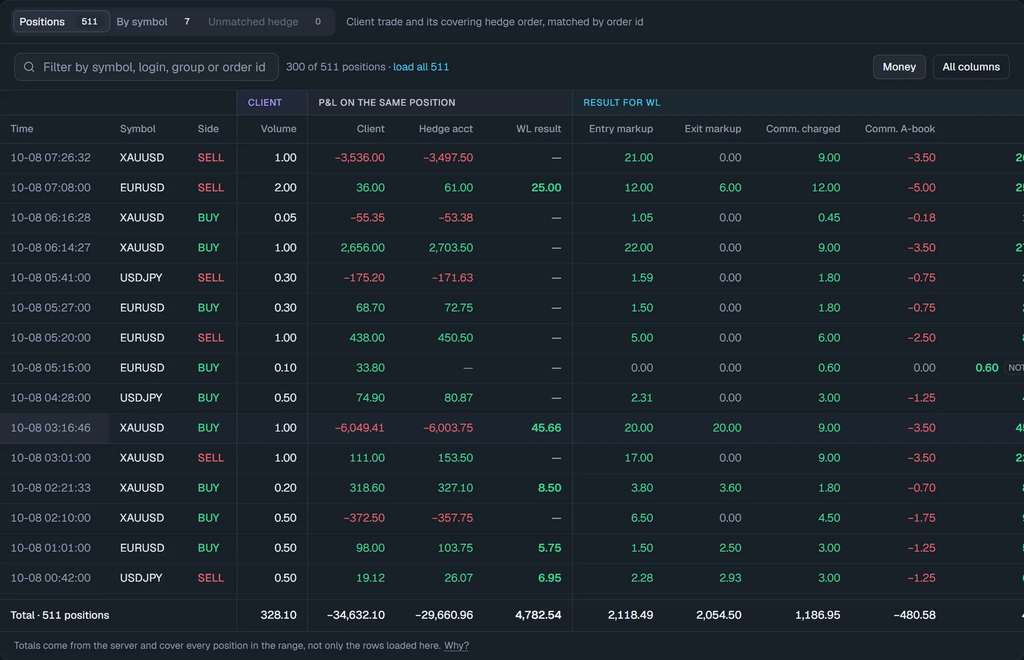
Each position with its markup, commission charged and commission paid. A position with no hedge order is flagged and left out of the totals. Illustrative data.
Find the symbols that don’t pay
Revenue per million (RPM) is net revenue per USD 1 million of notional. It lets you compare symbols and weeks of different size.
- By symbol, against your target. Set one target RPM, or one per symbol. Each bar shows how far the symbol sits from it.
- By day. Every day is split into entry markup, exit markup, commission and swap charged, and what the hedge account paid. A bad day stands out.
- Any range. Live as trades arrive, or any period from the last hour to the last 12 months.
- Coverage. Client positions with no hedge order are labelled “not hedged” and kept out of the totals. A routing gap shows up on the day it happens.
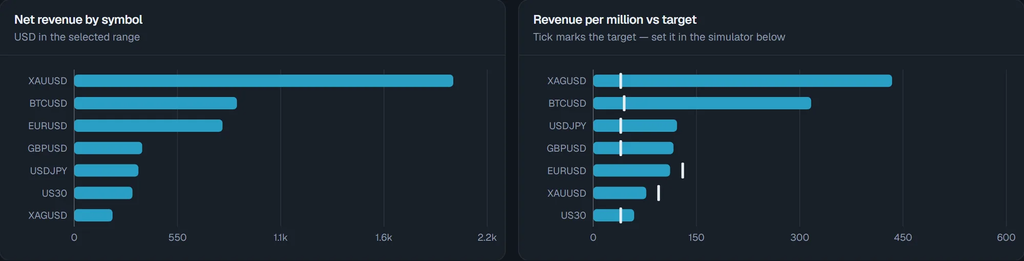
Revenue and RPM by symbol, with the target marked on each bar. Illustrative data.
How much markup each symbol needs
The Markup simulator answers one question: how much wider must the price be on each symbol to reach your target RPM?
Take an example, on illustrative data. XAUUSD runs at RPM 77.1 against a target of 95. On USD 26.2 million of notional, closing that gap takes about $470 more revenue. Over 54.8 lots, that is $8.57 per lot, or 0.043 more on the price on each side of the trade.
The simulator assumes volume stays the same. A wider price can cost you volume, so read its answer as the most you could gain. It gives you the size of the change. Where to make it, on markup, commission or the set-up of the symbol, is your decision. If a symbol stays below target at a markup your clients will accept, bring the numbers to us and we can look at how that symbol’s liquidity pool is set up.
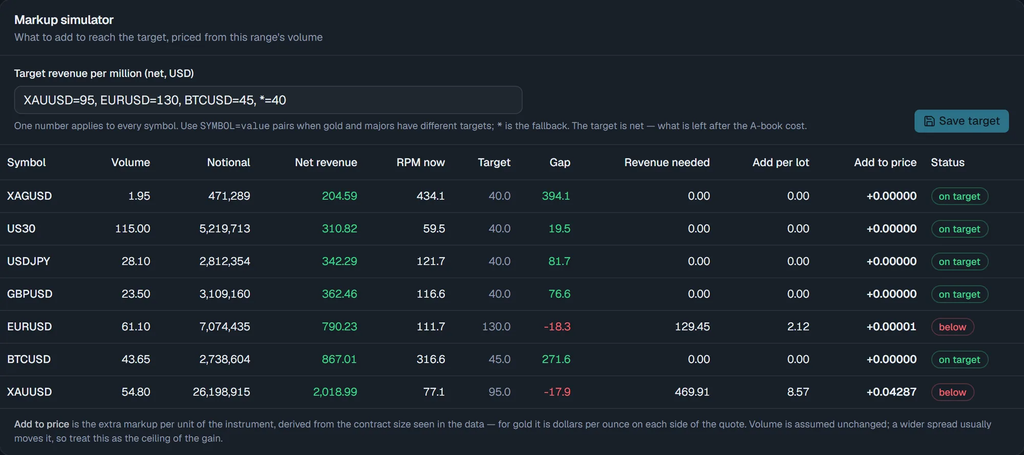
Gap to target, revenue needed, and the extra markup per lot and per price unit. XAUUSD and EURUSD below target. Illustrative data.
When two figures disagree
Two checks run on every view:
- Markup from the two prices is compared with the markup implied by each trade’s profit. They must match within rounding.
- Revenue from prices and fees is compared with revenue from the account balances.
If either comparison fails, the dashboard marks the period as unverified with a red banner. If a day looks wrong, the trade view shows which fills caused it. Send those order ids to the FX-EDGE team.

The data-quality strip, every check green. Illustrative data.
What it covers
Hedge Analytics covers A-booked flow on Match-Trader White Labels that hedge with FX-EDGE. It does not cover B-book flow, MetaTrader set-ups connected through the bridge, Real Market Liquidity prop accounts or Predictions. It shows what is charged on the hedge account. Your monthly service fee is not in the dashboard. Setting it up takes a read-only API token from your CRM and the login for your hedge account, in five steps. The app only reads, so your routing and groups stay as they are.
What comes with an A-book at FX-EDGE
| What you get | |
|---|---|
| Platform | Match-Trader White Label, from Match-Trade Technologies. FX-EDGE is an official Match-Trade partner |
| Liquidity | 430+ instruments across six asset classes, including FX, indices, commodities and crypto, on one account |
| Execution | Sub-3ms execution, 50,000 TPS, no last look |
| Set-up | Custom liquidity pools with independent routing logic; leverage up to 1:200 |
| Connectivity | Free access to Match-Trader’s MT4/MT5 bridge for A-Book and B-Book |
| Entry cost | $1,000 a month to start, no monthly minimums for White Label partners |
| Revenue analytics | Hedge Analytics: what you kept on every A-book trade, by symbol and by day, against your target |
Before you move any flow, answer one question from your own records: which symbol earned your A-book the most per million traded last month, and which earned the least? If it takes a spreadsheet to answer, start there. Once you’re connected, open the simulator on last month’s data and begin with the symbol furthest below target.
Hedge Analytics is available to Match-Trader White Label brokers who A-book with FX-EDGE. Setup and features: Match-Trader’s announcement. Talk to the FX-EDGE team about connecting your hedge account, or start with a free cost analysis of your current set-up.
FAQ
What is Hedge Analytics?
A read-only dashboard from Match-Trade Technologies for Match-Trader White Label brokers. It pairs every A-booked client trade with the hedge order that covered it and shows the markup, commission and swap on both sides, and the net result per trade, per symbol and per day.
Which FX-EDGE clients can use it?
Brokers running a Match-Trader White Label who A-book with FX-EDGE. It reads the broker’s CRM and its hedge account with FX-EDGE. It does not cover B-book flow, MetaTrader bridge set-ups, Real Market Liquidity prop accounts or Predictions.
Are FX-EDGE’s charges included in the result?
Yes. Net revenue is after the commission and swap charged on your hedge account, and both are shown trade by trade, in USD. Your monthly service fee is not in the dashboard.
Who prepares the figures?
Nobody prepares them by hand. They are worked out from your CRM and your hedge account. FX-EDGE does not prepare or edit them, and two automatic checks flag any period where the figures don’t agree.
Can Hedge Analytics place or change orders?
No. It only reads data. It never places, changes or closes orders, and it never changes anything in your CRM or on the platform.
How does the Markup simulator work?
You set a target RPM, for all symbols or per symbol. For each symbol below target, the simulator shows the revenue needed to close the gap, the extra per lot, and the extra on the price on each side of the trade. It assumes your volume stays the same, so its answer is an upper bound.
What if a day’s numbers look wrong?
The trade view shows which fills caused it. Send those order ids to the FX-EDGE team.